For the non-engineers in the room · A practical primer
GitHub for Product People
Repositories, pull requests, and setting up your first local AI agent. No prior coding required.
live demo · set up afterwards
Why this session
You don't need to write code. You do need to read the room
Your engineers live in GitHub all day. Knowing the vocabulary makes every standup and review faster.
AI agents now do real work inside a repository. To use them, you need to know what a repo and a pull request are.
Reading a pull request lets you see what's actually shipping, not just what the ticket or the roadmap says.
By the end you'll know the words, see a change ship live, and have a setup path for your own AI agent.
02
The mental model
GitHub is "Track Changes" for code
One shared place where a team works on the same files. Think Google Docs:
everyone sees the full version history, and changes are suggested and reviewed
before they become part of the document.
GitHub does the same for a whole project of files.
03
What that buys you
Three things you get
Version history
Every change: who made it, when, and why.
Collaboration
Many people, one project, no overwriting each other.
Review
Nothing important changes without a "looks good".
Strictly: Git is the system that tracks the changes; GitHub is the shared website where the team reviews and approves them. In practice people say "GitHub" for both.
04
01 / 04
repository · "repo"
The project folder
A repo is one project's folder of files, plus its entire history.
Open a repo and you can see every version that ever existed and rewind to any of them.
One product, one tool, one website → usually one repo.
05
02 / 04
commit
A saved snapshot
A commit is a saved checkpoint with a short message saying what changed.
Think of it as "Save", but with a note and your name attached.
The history of a repo is just a long line of commits.
# a commit message Update Q3 roadmap in README
06
03 / 04
branch
A safe parallel copy
A branch lets you work on changes without touching the live version everyone relies on.
The official version is the main branch. You make a side branch, experiment freely,
and only merge back when it's ready.
Break things on a branch → nobody else is affected.
07
04 / 04
pull request · "PR"
"Please review my change"
A pull request proposes merging your branch into main. It's where the team
sees the change, comments line-by-line, discusses, and approves, before anything goes live.
This is the heart of how software teams collaborate. If you read one thing on GitHub, read the PR.
08
How a change actually ships
The pull request lifecycle
1
Branch
make a safe copy
→
2
Commit
save changes with notes
→
3
Open PR
propose the change
→
4
Review
team comments & approves
→
5
Merge
it's now in main
Step 4 is where most people start: reading the PR, asking questions, giving the nod. By the end of this session you'll have a tool that can walk you round all five.
Merged into main is not the same as released to customers. Deploying is a separate step.
09
Why a tool for this at all
Why GitHub beats email, chat, and a shared drive
One source of truth: no "final_v3_FINAL.zip". There's main, and there's history.
Accountable history: every change is tied to a person, a reason, and a moment in time.
Review built in: discussion happens on the exact line that changed, not in a lost email thread.
Automation: tests and checks run on every PR, catching problems before they ship.
It's where the work already is: your engineers and your AI agents both live here.
10
Quick reference · keep this slide
The rest of the words you'll hear
clone
Download a copy of a repo to your computer.
fork
Your own copy of someone else's repo.
main
The official version everyone builds on.
merge
Fold an approved branch into main.
issue
A ticket or work item: a bug, task, or idea, discussed in the repo.
README
The front-page doc explaining what the repo is.
push / pull
Send your commits up / get others' commits down.
diff
The exact lines added and removed by a change.
review
Approve, request changes, or comment on a PR.
11
Local vs remote
Two copies: yours, and GitHub's
GitHub is the remote: the shared copy in the cloud, the source of truth.
Your laptop holds a local copy, and that's where you and your tools actually work.
You clone or pull to bring the latest down, change things locally,
then push and open a pull request to send them back up.
Your AI tools work on the local copy. Some agents instead run in the cloud and open the pull request for you: same model, different place it runs.
12
Switch to the browser
Live demo: ship a change in 5 minutes
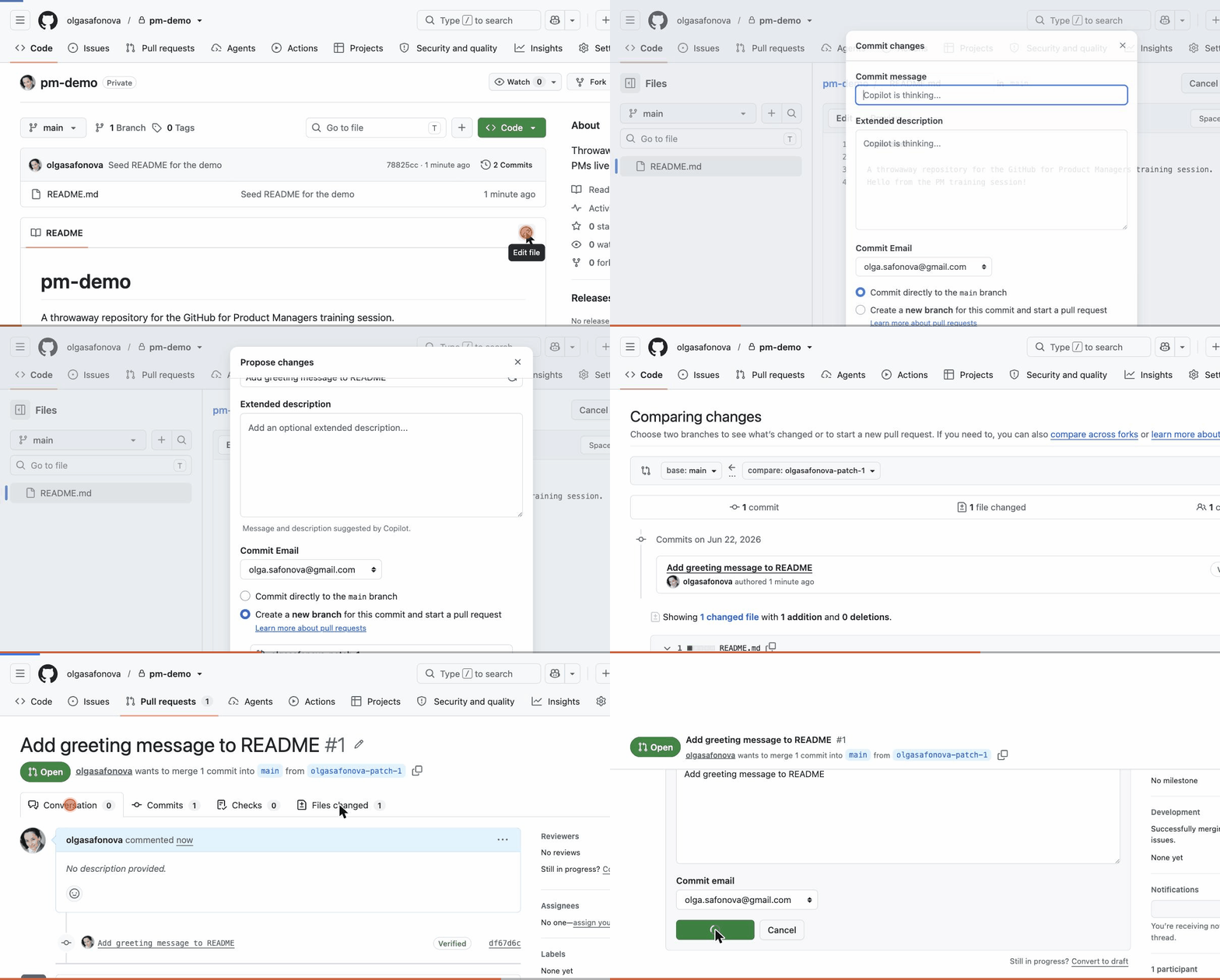
Open a repo → edit the README in the browser
Create a branch → commit the edit
Open a pull request → leave a review comment → merge
A coding agent reads your project's files, answers questions about them, and makes changes,
then hands you a commit or a pull request to review. You direct in plain English; it does the typing.
Explore: "explain how this part of the product works."
Prototype: "build me a rough version of this idea to react to."
Draft: "turn this spec into a first pull request the team can review."
You still review everything. The PR workflow you just learned is exactly how you check its work.
15
The landscape · four common tools
Pick one to start. They overlap a lot
Claude Desktop
Claude Code
Cursor
Codex
Maker
Anthropic
Anthropic
Anysphere
OpenAI
Looks like
A chat app
The terminal
A code editor
Terminal / editor / cloud
Barrier
Lowest, just install
Medium, comfort with a terminal
Low, familiar editor window
Medium, terminal or extension
Best for
Asking questions, light file work
Real repo work, commits & PRs
Editing code with AI alongside
OpenAI users wanting an agent
Account
Claude (free / Pro / Enterprise)
Claude (Pro / Max / Enterprise) or API
Free tier / Pro / Enterprise
ChatGPT (Plus / Pro) or API
Start point for most product people:Claude Desktop to get comfortable, then Cursor or Claude Code when you want to touch a real repo.
16
Setup · do this after the session
First-run, four ways
Claude Desktop
Easiest · no terminal
1 · Download the app from claude.ai/download (Mac/Windows). 2 · Sign in with your Claude account. 3 · Drag in a file or connect a folder, then ask away.
Cursor
Editor with AI built in
1 · Download from cursor.com. 2 · Open a project folder. 3 · Press the chat shortcut, sign in, and ask it to explain or change code.
Claude Code
Terminal · real repo work
1 · Install Node.js, then run npm i -g @anthropic-ai/claude-code 2 · In a repo folder run claude, sign in, start prompting.
Codex
OpenAI's agent
1 · Install via npm i -g @openai/codex 2 · Run codex in a repo and sign in with ChatGPT, or use it inside the IDE extension.
Before you point an agent at company code: use only approved tools, and never paste secrets, credentials, or customer data into an AI tool. Check with IT or security if unsure.
Versions and commands change, so confirm against each tool's official docs page before installing.
17
Setup · connect the tool to GitHub
Point it at GitHub
Cursor
Local git
Command palette → GitHub: Sign in, authorize. Then Git: Clone your repo; commit and push in the Source Control panel.
Claude Code
Local git
Run gh auth login once to connect GitHub. Then run claude in the cloned repo; it branches, commits, and opens PRs.
Codex
Local git
Run codex in a cloned repo (uses your git). Or in Codex cloud, connect your GitHub account and let it open PRs.
Claude Desktop
Connector · paid plan
Settings → Connectors → add GitHub, authorize. Reads repos, issues, and PRs, and can open a PR, all remotely. No local clone.
Same idea everywhere: authenticate once, then point the tool at a repo. Only Claude Desktop skips the local copy and works through GitHub's API.
18
Getting started · with any of these tools
Your first repo, end to end
1
Open
point your tool at a repo
→
2
Ask
"explain this project"
→
3
Change
say what to fix or build
→
4
Review
read the diff like a PR
→
5
Ship
commit · push · PR
This is the local loop: Cursor, Claude Code, and Codex clone the repo and work on your machine. Claude Desktop reaches GitHub through its connector instead, so it reads and can draft a PR, but skips the local clone.
If the repo lives on GitHub, clone it to your machine first, then open it. Your tool handles the push and pull request at the end.
19
Switch to the browser · a real one
A repo I actually built: miro-mcp-server
Read the README: it lets an AI assistant control a Miro board, in plain English.
Open a recent pull request and read the diff, exactly like we just practiced.
Look at the commit history: every change, who, when, and why.
It's public, so you can open it and poke around after: github.com/OlgaSafonova/miro-mcp-server
20
Try it yourself
Three steps to take from here
Make a GitHub account at github.com, free. Two minutes.
Install one AI tool from the previous slide. If unsure, pick Claude Desktop.
Ask it one real question about a document or a repo, and read what it gives back like you'd read a PR.
Stuck on setup? That's expected. The error message is the starting point, not a dead end, so paste it back into the tool and ask it to walk you through the fix.
21
Recap
Repo. Branch. Commit. Pull request
That's the whole vocabulary. A pull request is where work becomes real, and where you'll review what an AI agent builds.
 Claude Desktop
 Claude Code
 Cursor
 Codex
Codex